Top UptimeRobot Competitors & Alternatives in 2026: Feature & Pricing Comparison

Max Rozen / Published: October 01, 2026
Last updated: October 01, 2026
If UptimeRobot says your app is up but customers can't use it, check what your monitor is testing before you replace it.
An HTTP check can fetch the dashboard's HTML without running the JavaScript that renders it. An API can return 200 OK with an error in the response body. And a backup job can fail without affecting the website at all. You need a different check for each of these.
UptimeRobot's paid plans already support JSON assertions, regional checks, and heartbeats. If you're missing an assertion, add it. If you need to test a browser interaction, run an existing Playwright project, or change how your team handles on-call, you'll have more reason to switch.
Below, I compare six alternatives, including their browser runtimes and the cost of two small-team setups. There's a Playwright and Terraform example you can adapt to your own app too.
OnlineOrNot is a good fit if you want standalone Playwright checks alongside uptime monitoring and status pages, especially when you manage infrastructure with Terraform. Checkly supports larger Playwright projects; Better Stack and Hyperping include on-call features. For self-hosting, look at Uptime Kuma. If your logs and traces already live in Datadog, its synthetic tests can save you switching tools during an incident.
I build OnlineOrNot. This comparison uses vendor documentation and prices checked on October 1, 2026, plus our scheduling and pricing code. The HTTP and browser examples have local checks behind them; I haven't benchmarked all six vendors' alert speed.
On this page
- UptimeRobot and its current plans
- Quick comparison of the alternatives
- What your check actually proves
- Regions, retries, and alert timing
- OnlineOrNot
- Better Stack
- Checkly
- Uptime Kuma
- Hyperping
- Datadog Synthetic Monitoring
- Price two monitoring setups
- How to evaluate and switch
- Frequently asked questions
What does UptimeRobot already do well?
UptimeRobot offers hosted monitoring with HTTP, keyword, ping, and port checks, plus a mobile app and public status pages. Paid plans extend that coverage to API responses, DNS, UDP, certificate and domain expiry, heartbeat monitoring, and location-specific checks.
Its API monitoring supports JSON-field assertions with all/any logic, custom requests, Basic/Digest auth, and JWTs in headers. OAuth2 support is still in development according to that page, so don't assume it will refresh an expiring token for you.
The regional-monitoring docs describe rotating checks across selected regions, then confirming a failure with multiple nodes in the affected region. You can set regional response-time thresholds and receive a region-specific alert.
You can use those features for production monitoring without changing providers.
UptimeRobot pricing and plan differences
The pricing page showed these EUR prices when checked. Your local prices may differ.
| Plan | Price per month | Monitoring | Team access |
|---|---|---|---|
| Free | €0 | 50 monitors; 5-minute checks | No extra login seats |
| Solo, entry tier | €10 monthly; €9 with annual billing | 10 monitors; 60-second checks | No extra login seats |
| Team | €41 monthly; €35 with annual billing | 100 monitors; 30-second checks | 3 login seats included |
| Scale, entry tier | €77 monthly; €65 with annual billing | 200 monitors; 15-second checks | 5 login seats included |
| Enterprise | Custom | Custom limits and intervals | Confirm with sales |
Solo also has a 50-monitor tier; Scale has a 500-monitor tier. Extra login seats on Team and Scale are paid add-ons. Login seats and contacts who only receive alerts are separate allowances.
Status pages are already part of UptimeRobot: Solo includes three with custom domains, Team includes 100, and Scale includes unlimited pages. Subscriber notifications and password protection are available on Team and Scale.
I'd keep UptimeRobot if its checks cover your failures and you use the mobile app or need lots of status pages. Its 50 free monitors and Scale's 15-second checks are also hard to ignore. The alternatives below make more sense when you need browser scripts, different team pricing, or a different deployment setup.
UptimeRobot competitors at a glance
Start with the row that describes your setup, then check the limits in the product's section.
| Competitor | Useful for | Starting price |
|---|---|---|
| OnlineOrNot | You want uptime, browser journeys, jobs, and status pages with unlimited paid-plan team access and Terraform | Hobby free; Pro $15 per month on monthly billing |
| Better Stack | You want monitoring connected to on-call schedules and incident response | Free tier; responder licenses $34 per person per month on monthly billing |
| Checkly | You want a native workflow for Playwright suites and CI deployment | Hobby free; Starter Detect $29 per month on monthly billing |
| Uptime Kuma | You want monitoring inside your own infrastructure | Free open-source software; hosting is your cost |
| Hyperping | You want browser monitoring with built-in on-call, status pages, and server agents | Free tier; Essentials €29 per month on the reviewed monthly pricing page |
| Datadog Synthetic Monitoring | You want failed checks connected to your existing Datadog investigation workflow | API tests from $5 per 10,000 runs; browser tests from $12 per 1,000 runs, billed annually |
Pingdom and StatusCake are other options for website monitoring; our tools guide covers them.
First decide what your check needs to prove
Pick the check based on the failure you want to catch:
| Failure | Check that can detect it | Check that can stay green |
|---|---|---|
Origin returns 503 |
HTTP check with expected status | A check that deliberately accepts 503 |
API returns 200 but database is unavailable |
Assertion on the dependency field | Status-only HTTP check |
| HTML loads but client-side results never render | Browser action plus rendered-content assertion | HTTP check on the HTML shell |
| European customers cannot reach the CDN | Check from Europe with an appropriate incident policy | A healthy probe elsewhere |
| Backup job never finishes | Heartbeat sent after successful completion | Heartbeat sent when the process starts |
A 200 OK API response can still need an alert
Suppose /api/health returns this with HTTP 200:
{
  "status": "ok",
  "dependencies": {
    "database": "unavailable"
  }
}
Set the assertion to $.dependencies.database equals ok. Checking the top-level status field would miss the database failure.
OnlineOrNot supports JSONPath body assertions, along with header, text-body, and HTML-selector assertions. UptimeRobot supports JSON-field validation too, so either can catch this once you configure it.
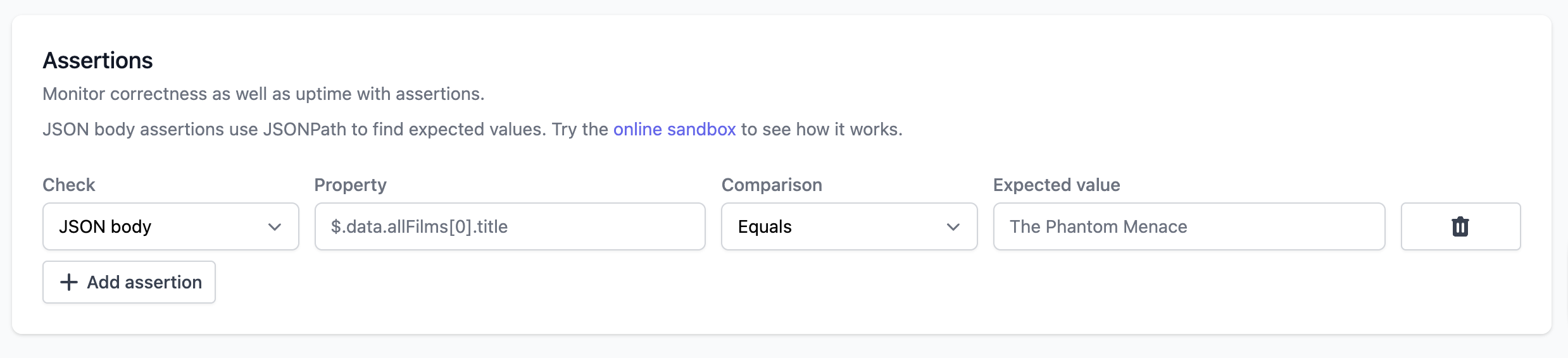
A JSONPath assertion in OnlineOrNot's editor. Use the property field to select the value you want to check.
A browser opening a URL is not enough either
A browser can load /catalog successfully while the “Show products” button does nothing. Click it in the script and check that the results appear.
For the local example, both versions returned HTTP 200. One rendered results after the click; the other threw a JavaScript error in the click handler.
| Controlled example | Status-only check | Check of the intended result |
|---|---|---|
| Working catalog | Pass | Pass: results heading becomes visible |
| Broken results renderer | Pass | Fail: results heading never appears |
| Unavailable database in the JSON above | Pass | Fail: dependency value is not ok |
The Playwright example below checks for the results heading. A navigation-only script would pass both versions.
Regions, retries, and alert timing are different settings
If you need an alert when European customers can't reach the app, check the regional schedule and failure policy. A vendor advertising “30-second checks from multiple regions” may rotate probes rather than run every region every 30 seconds.
Read the retry policy too. A second probe in the affected region can confirm a local failure; a successful retry elsewhere can tell you that the problem isn't global. Then check how long the failure must persist before the tool alerts you.
How often does each region run?
UptimeRobot rotates through selected regions. OnlineOrNot also selects one region per scheduled run; our scheduler avoids the previously used region where possible.
Suppose three regions take turns at 30-second intervals. An even rotation would revisit Europe every 90 seconds. Neither vendor promises that exact schedule, but it's why you need to ask about the cadence per region.
UptimeRobot confirms failures within the affected region, which helps when Europe is down but North America still works. OnlineOrNot uses cross-region verification to reduce transient false alarms. If a failure in one region must page you, test that behavior with a region-targeted check before switching.
When does a failed check send an alert?
OnlineOrNot's confirmation period lets you wait before declaring an incident. Its recovery period delays the all-clear. This helps when a service briefly comes back, fails again, and otherwise fills your alert channel with up/down messages.
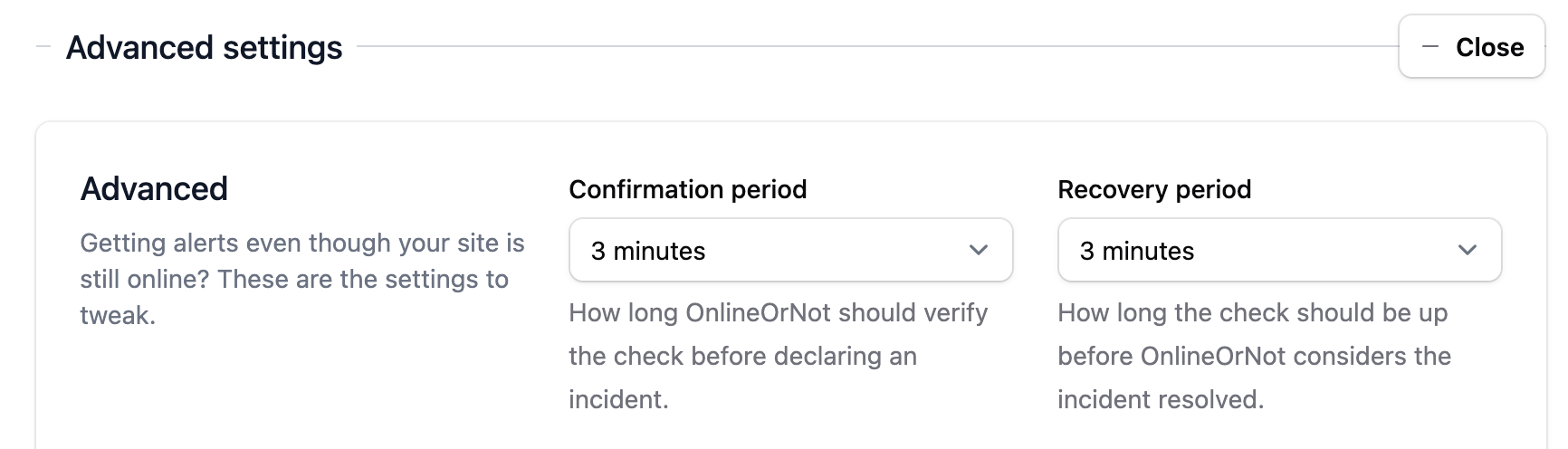
Three minutes selected for confirmation and recovery. You can change both.
For example, with 30-second polling and a request that fails after five seconds, an outage that starts just after a poll could take about 35 seconds to produce the first failed result. A 60-second confirmation period adds more waiting before notification, as do retries and delivery delays.
Use the same confirmation settings when comparing tools, or you'll mistake a difference in alert policy for a difference in speed.
1. OnlineOrNot: for production software teams
OnlineOrNot handles uptime, API, browser, and scheduled-job checks in the same account. Pro includes unlimited team members and a public status page with a custom domain and unlimited email subscribers.
I'd put it on your list if several developers need access and you want to manage the monitors alongside your infrastructure. Our Terraform provider supports checks, heartbeats, status pages, and alerting resources, including Playwright checks.
You can send failures to the team's existing alert channels or on-call tool. OnlineOrNot doesn't replace the rota and escalation rules in PagerDuty; Better Stack and Hyperping include those features if you're looking to buy them too.
A browser check you can keep beside your infrastructure
Here's the catalog example as a standalone Playwright file. Replace the URL, button, and heading with a read-only path in your app.
Save it as catalog.spec.js:
import { test, expect } from '@playwright/test';

test.setTimeout(30_000);

test('catalog returns products', async ({ page }) => {
  const response = await page.goto('https://example.com/catalog');
  expect(response?.status()).toBe(200);

  try {
    await page
      .getByRole('button', {
        name: 'Show products',
        exact: true,
      })
      .click();

    await expect(
      page.getByRole('heading', {
        name: 'Available products',
        exact: true,
      }),
    ).toBeVisible({ timeout: 10_000 });
  } finally {
    await page.screenshot({ path: 'catalog.png' });
  }
});
toBeVisible() waits for the heading, so you don't need a fixed sleep after clicking. The finally block saves a screenshot even when that assertion fails. OnlineOrNot attaches screenshots saved with page.screenshot() to the run output.
To deploy it with Terraform:
terraform {
  required_providers {
    onlineornot = {
      source = "onlineornot/onlineornot"
    }
  }
}

provider "onlineornot" {}

resource "onlineornot_browser_check" "catalog" {
  name          = "Catalog returns products"
  script        = file("${path.module}/catalog.spec.js")
  test_interval = 300
  test_regions  = ["aws:us-east-1"]
}
Set ONLINEORNOT_API_KEY for the provider. Terraform reads the script file and configures the monitor to run every 300 seconds in aws:us-east-1. The deployment guide covers testing locally, selecting a provider version, and deploying.
Keep the resource address stable when updating the script; Terraform will update the existing monitor and keep its history. If someone edits the script in the dashboard, the next plan can show that drift. Be more careful with filename-based resource keys: renaming a file can plan deletion of the old monitor and creation of a new one.
What you can upload
This Terraform workflow uploads one self-contained JavaScript file. It won't upload local imports, npm dependencies, or your playwright.config project. The script must contain valid JavaScript and finish within the 120-second service limit.
OnlineOrNot's organization environment variables currently work in uptime-check headers and Basic Auth, but don't work in browser scripts. A local process.env value won't appear in the remote run either. Don't put a real password in the script: Terraform stores it in state and can show it in a plan.
For independent browser checks, this setup is easy to keep in the same repository as your infrastructure. If you need shared fixtures or custom packages, look at Checkly's suite support. Hyperping documents browser environment variables if that's a requirement.
OnlineOrNot pricing
Pro starts at $15/month on monthly billing, with 10 uptime monitors, 3,000 browser runs per month, unlimited team members, and one public status page. Additional monitors cost $10 per pack of 25; additional browser runs cost $4 per 1,000. Extra public status pages cost $24/month each, and private pages are an additional paid option.
One browser check every five minutes schedules 8,640 runs in a 30-day month. Selecting three regions still schedules one execution per cycle; creating three separate monitors schedules 25,920 runs. The pricing examples below show how the run packs add up, before retries and manual runs.
OnlineOrNot vs UptimeRobot
| Requirement | OnlineOrNot | UptimeRobot |
|---|---|---|
| Body correctness | JSONPath, header, text, and HTML assertions | JSON-field assertions on paid API monitoring |
| Browser interaction | Standalone Playwright journey | No scripted browser type in reviewed catalog |
| Regional execution | One selected region per scheduled run | Rotation through selected regions |
| Failure policy | Cross-region verification; configurable confirmation and recovery | Documented confirmation within affected region; regional alerts |
| Team dashboard access | Unlimited on Pro | 3 seats Team; 5 Scale; paid additional seats |
| Status-page count | One public page on Pro; extra pages paid | Three Solo; 100 Team; unlimited Scale |
UptimeRobot offers more free monitors, more included status pages, and 15-second polling on Scale. OnlineOrNot doesn't provide application tracing or log aggregation.
If that setup covers what you need, try OnlineOrNot alongside UptimeRobot for 14 days. You can also read the Terraform guide first.
2. Better Stack: for monitoring and on-call response
Better Stack combines monitoring with on-call schedules, escalation policies, incident timelines, and status pages. Its broader platform also provides logs and other telemetry.
Its on-call system assigns an incident to the current responder and escalates if nobody acknowledges it. That's useful if you currently maintain a separate rota and incident tool. If you already use PagerDuty and like it, you'll need less of what Better Stack sells.
Better Stack pricing
The free tier includes limited monitoring and a status page. Paid responder licenses are $34 per responder per month on monthly billing, or $29 with annual billing. Additional uptime monitors, heartbeats, and status-page options are separately priced. Playwright transaction monitoring costs $1 per 100 browser minutes.
Check which teammates need responder access. A free telemetry user and a paid incident responder have different permissions.
Because it bills browser minutes, a stuck script costs more than a quick run at the same frequency. Set timeouts and measure failed runs too. Two scripts taking 20 seconds each, every five minutes for 30 days, schedule 5,760 minutes before retries: $57.60 at its browser rate, on top of responder and monitor charges.
3. Checkly: for Playwright suites and CI workflows
Checkly supports API and browser checks, uptime monitors, and heartbeats. I'd look at it first if you want to run an existing Playwright project in production with its shared helpers and dependencies.
You can keep OnlineOrNot checks in Git with Terraform too. Checkly adds TypeScript/JavaScript constructs and its own CLI; it also has Terraform and Pulumi providers.
Browser Checks or Playwright Check Suites?
Its Playwright comparison distinguishes single-file Browser Checks from Playwright Check Suites:
| Capability | Browser Check | Playwright Check Suite |
|---|---|---|
| Test source | One spec file | Multiple spec files |
| Browsers | Chromium/Chrome | Chromium, Firefox, WebKit |
| Packages | Fixed runtime dependencies | Custom public and private dependencies |
| Project structure | Partial configuration support | Playwright projects, tags, storage state, and configuration |
If your spec contains import { login } from './helpers', you'll need to deploy the helper as well as the spec. Checkly's suites handle that project structure; its single-file Browser Checks use a fixed set of runtime dependencies.
You may still need to change the tests. A CI suite that seeds a database or resets accounts won't be suitable for repeated runs against production. Pick a path that you can run repeatedly without changing customer data. For internal services, Checkly offers private locations on Team and Enterprise.
Checkly pricing
Starter Detect costs $29/month on monthly billing, or $24/month with annual billing. It includes 50 uptime monitors, 3,000 browser runs, 25,000 API runs, and three users.
Starter Communicate adds status pages for $12/month, taking Detect plus Communicate to $41/month before extra usage. Resolve diagnostics cost extra too. Hobby has free allowances across the modules.
4. Uptime Kuma: for self-hosted monitoring
Uptime Kuma is an open-source monitoring tool you run yourself. It supports HTTP, keyword and JSON-query checks, TCP, ping, DNS, push monitors, Docker containers, and multiple status pages.
The software is free; you pay for hosting, backups, and any paid notification services. You'll also need someone to update and maintain it.
Where to run it
A Kuma instance inside your network can check a private database port or Docker container that an external probe can't reach. You'll still need an external check to test public DNS and the route through your CDN.
Don't put your only monitor on the same host as the app. If that host dies, the monitor dies with it. Running Kuma internally alongside a hosted external check gives you coverage for both private services and the customer-facing path.
Back up its configuration and test the notification integration after changing it. Kuma also supports push monitors for jobs; send the ping after successful completion, or a job that starts and then crashes could still look healthy.
5. Hyperping: for monitoring, status pages, and on-call
Hyperping combines uptime monitoring, Playwright browser checks, cron monitoring, status pages, server monitoring, and on-call features.
Paid plans include on-call schedules and escalation policies. Server agents collect CPU, memory, disk, and network metrics, so you can check the host as well as the public endpoint.
Hyperping pricing
The free plan includes 20 monitors with five-minute checks, one seat, and a basic status page. The rendered pricing page showed Essentials at €29/month or €290/year (about €24/month). That includes 50 monitors, three browser checks, three seats, and one custom-domain status page with 100 subscribers.
The pricing table lists 30-second uptime checks and five-minute browser intervals on Essentials. It charges by the number of browser checks rather than selling an included run allowance. Additional seats cost extra.
Browser credentials and failure output
Hyperping's browser-check documentation specifies headless Chromium, a two-minute run limit, per-monitor environment variables, and a default retry from another region before opening an outage. Its newer runtime documents failed-run traces and video, plus per-step reporting through test.step().
You can replay a failed run to see where it stopped. Its browser environment variables also let you supply credentials without putting them in the script; OnlineOrNot's documented browser workflow doesn't currently support that.
Essentials' three included browser checks can be cheaper than buying run packs if you want two scripts running every five minutes. Check the selected locations and retry policy when setting them up.
The status-page limits may push you onto another plan. Essentials includes 100 subscribers; Pro includes 1,000 and adds private and multilingual pages. You'll need Business to remove Hyperping branding. Extra Essentials seats cost €7/month each on the page checked.
6. Datadog Synthetic Monitoring: for teams already using Datadog
Datadog Synthetic Monitoring supports API and browser tests, managed and private test locations, and integrations with the wider Datadog platform.
If your team already uses Datadog APM or RUM, you can investigate a failed synthetic test alongside that data. Its browser recorder lets you create tests without writing a script and records screenshots for each step.
Datadog pricing
Synthetic API tests start at $5 per 10,000 runs, and browser tests start at $12 per 1,000 runs, billed annually. Month-to-month rates are $6 and $15 respectively; on-demand rates are $7.20 and $18.
At the month-to-month API rate, 20 endpoints checked once per minute for 30 days produce 864,000 runs: $518.40 before contract rounding or other charges. Two browser scripts every five minutes add 17,280 runs, or $259.20. Those figures don't include a status page, APM, logs, or incident-response seats.
Datadog's APM and RUM integration can help you trace a browser failure to a backend dependency, provided you've configured that telemetry. That's a reason to pay for it if you already work in Datadog. For simple endpoint monitoring, per-monitor pricing is often easier to budget than paying for every HTTP execution.
Pricing for two small-team setups
To compare bills, let's price 20 endpoints and a status page, then add two browser checks. Both examples use monthly billing.
UptimeRobot and Hyperping showed EUR prices; the others showed USD. Keep the currencies separate when comparing them. The figures exclude taxes, SMS/phone usage, white-labeling, private pages, retries, and manual runs.
Workload A: 20 endpoints and a shared status page
Assume 20 HTTP monitors, three dashboard users, and one public custom-domain page with email subscriber updates. For Better Stack, all three users need responder access. Polling intervals, retention, and incident features still differ between these plans.
| Product | Required package and arithmetic | Monthly budget |
|---|---|---|
| OnlineOrNot | Pro $15 + one 25-monitor pack $10; members and page included | $25 |
| UptimeRobot | Team, including 100 monitors, 3 login seats, and subscriber-capable pages | €41 |
| Checkly | Starter Detect $29 + Starter Communicate $12; 3 users and page included | $41 |
| Hyperping | Essentials, including 50 monitors, 3 seats, and one page with 100 subscribers | €29 |
| Better Stack | 3 responders × $34 + one extra 50-monitor pack $25; page included | $127 |
Better Stack's bill includes its incident-response features. UptimeRobot includes 100 status pages when you only need one. With OnlineOrNot, you buy a smaller monitor allowance but can invite more developers without paying for seats.
At five dashboard users, OnlineOrNot still costs $25. Hyperping Essentials adds two €7 seats, bringing it to €43. UptimeRobot Team needs two extra login seats, or you could use Scale with five included seats. Checkly Starter only includes three users, so you'd need a different plan.
Workload B: add two browser journeys every five minutes
Keep Workload A and add two independent browser journeys, one scheduled execution per journey per cycle, in a 30-day month:
30 days × 24 hours × 60 minutes ÷ 5 minutes
  = 8,640 scheduled runs per journey

2 journeys × 8,640 = 17,280 scheduled runs
For OnlineOrNot and Checkly Starter, the included allowance is 3,000 browser runs. Covering the remainder requires 15 additional 1,000-run packs: ceil((17,280 - 3,000) / 1,000).
| Product | Browser addition to Workload A | Combined monthly budget |
|---|---|---|
| OnlineOrNot | 15 packs × $4 = $60 | $85 |
| Checkly | 15 packs × $5 = $75 | $116 |
| Hyperping | Two of Essentials' three browser checks, at its published 5-minute interval | €29 |
| Better Stack | If each execution averages 20 seconds: 5,760 minutes × $0.01 | About $184.60 at the unit rate |
| UptimeRobot alone | No scripted browser-monitoring type in the reviewed catalog | Does not cover this workload alone |
For Better Stack, actual duration, billing rounding, retries, and failed-run timeouts can change the browser total. For the other run-based products, budget additional executions separately. A 31-day month also schedules more runs.
For these two browser scripts, Hyperping's included checks are a good deal. I'd still compare the runtime against your scripts before buying: a cheaper plan doesn't help if it can't run your dependencies. Checkly's suite support may justify the extra cost; OnlineOrNot suits independent files and a team that wants unlimited dashboard access.
What if each region needs its own check?
Selecting three regions on one OnlineOrNot monitor still schedules 8,640 runs every five minutes in a 30-day month. It picks one region per cycle.
If you want each region checked every five minutes, create separate region-pinned checks. Two scripts in three regions then schedule 51,840 runs in 30 days. That's above OnlineOrNot's current 50,000-run self-service selector, so ask about capacity before setting it up.
The OnlineOrNot calculator can help you price the run allowance you'll need.
How to evaluate an UptimeRobot alternative
If you're still deciding, use these requirements to narrow the list:
| Requirement | Products to compare |
|---|---|
| An app can be broken while its homepage is online | OnlineOrNot, Checkly, Better Stack, Hyperping, or Datadog browser monitoring |
| Developers need dashboard access without per-seat pricing | OnlineOrNot Pro |
| You need schedules, ownership, and escalations built in | Better Stack or Hyperping |
| Monitoring configuration should live in Git | OnlineOrNot's Terraform provider or Checkly's code-first tooling |
| Existing Playwright suites should become production monitoring | Checkly |
| Checks need to run inside your private network | Uptime Kuma, or a vendor's supported private-location offering |
| You already use Datadog to investigate production failures | Datadog Synthetic Monitoring |
| You only need a large free allowance of basic uptime checks | UptimeRobot may already be the right choice |
Compare the bill for your workload
Write down your uptime monitor count, required interval, browser journeys, run frequency, regions, dashboard users, alert channels, and status pages. Add subscriber and private-page requirements too.
Include the details that affect the plan: standalone scripts or a full project, rotating probes or parallel execution, dashboard users or alert-only contacts.
If OnlineOrNot fits that workload, estimate your monthly cost before starting the trial.
Run both tools before switching
Start with one endpoint and leave its UptimeRobot check running:
- Copy its full configuration: method, auth, headers, body, redirects, timeout, expected status, assertions, regions, and maintenance settings.
- On a test service you control, return an error status, then
200with an incorrect body. If you're adding browser checks, break an interaction while keeping the HTML response healthy. Record which checks fail. - Try a short outage and a sustained one, then make the service alternate between passing and failing during recovery. For regional coverage, make it fail only for the chosen probe region. Record when the tool detects the failure and when you receive the alert.
- Open the alert as if you were on call. Can you find the failed assertion or browser screenshot? Does the incident reach your on-call tool, then resolve when the test service recovers?
- Before moving the rest, check dashboard permissions, subscriber delivery, and Terraform drift. Keep the old configuration until the new one works for the people answering alerts.
Keep a small evaluation log:
| Record | Why it matters |
|---|---|
| Failure introduced; first failed run; alert received | Separates scheduling, detection, and delivery |
| Selected regions; confirmation and recovery settings | Makes the comparison reproducible |
| Failed assertion and available artifact | Shows whether the alert helps diagnosis |
| Recovery received; incident/page resolved | Verifies the full lifecycle, not only opening |
One alert arriving first isn't much evidence. Repeat the failures with the same settings before deciding that one tool is faster.
Ask about importing history and subscribers; don't assume they'll transfer. Keep any records you need before cancelling the old service.
For job monitoring, update the completion ping too. If the job keeps calling the old URL, the new monitor will report a missed run even though the job succeeded. Send both pings during the overlap, then remove the old one once you've checked delivery. Rotate endpoint credentials if the migration changes who can see them.
If you only want a different status page, you may not need to replace monitoring at all. OnlineOrNot can create status-page incidents from UptimeRobot webhook alerts; UptimeRobot's webhook integration requires an eligible paid plan.
If you want help moving your URLs, email me the monitor list. You can also start a 14-day OnlineOrNot trial without a credit card and leave UptimeRobot running while you compare them.
Frequently asked questions
What is the best UptimeRobot competitor?
For standalone browser checks alongside endpoint and job monitoring, I'd compare OnlineOrNot and Hyperping. Checkly is the stronger candidate for an existing Playwright project with dependencies. Better Stack includes on-call and incident response; Uptime Kuma lets you self-host. If your team already investigates incidents in Datadog, start there.
Is OnlineOrNot faster than UptimeRobot?
OnlineOrNot Pro and UptimeRobot Team both schedule uptime checks every 30 seconds. UptimeRobot Solo checks every 60 seconds and Scale every 15 seconds. The alert timing also depends on retries and confirmation settings, so compare those before drawing conclusions from the intervals.
Can I manage OnlineOrNot checks in Git?
Yes, with the Terraform provider. Keep the resource definitions and standalone Playwright files in your repository; file() reads the script when you run Terraform. You'll need a different deployment method for a complete Playwright project with dependencies.
Will selecting more regions multiply my browser bill?
OnlineOrNot selects one region per scheduled run, so adding regions to that monitor doesn't multiply scheduled executions. Creating separate region-pinned checks does. With another vendor, check whether its schedule rotates regions or runs them in parallel.
Does UptimeRobot support browser monitoring?
UptimeRobot doesn't list a scripted browser monitor in the product pages checked for this article. Its HTTP keyword checks can inspect response text, but they won't execute the JavaScript in your app or click through a flow. You'll need a browser check for that.
Is there a free UptimeRobot alternative?
OnlineOrNot, Better Stack, Checkly, and Hyperping have free tiers. Uptime Kuma is free software, though you'll pay for hosting it. Check the allowances before switching: UptimeRobot's 50 free monitors may cover more of your sites if five-minute polling is enough.
Can I switch without interrupting monitoring?
Leave the existing monitors running while you configure the new ones. Test failures, recovery messages, and alert destinations before turning off the old checks. Importing history is a separate question to ask the new provider.
Sources and review date
Sources checked on October 1, 2026. The two budget examples use monthly billing; UptimeRobot's plan table also lists annual equivalents. UptimeRobot and Hyperping showed EUR prices, while the other quoted rates are USD. Check the current local price and limits before purchasing.
- UptimeRobot: pricing, machine-readable plan matrix, API assertions and auth, and region rotation and failure confirmation.
- OnlineOrNot: pricing and calculator, assertion types, confirmation and recovery, scripted-check guide, environment-variable scope, Terraform provider, standalone Playwright deployment and runtime boundaries, and UptimeRobot status-page integration. Region selection and run-pack arithmetic were also checked against our current implementation.
- Better Stack: uptime and incident-response overview and pricing.
- Checkly: Browser Checks versus Playwright Check Suites, pricing, and module allowances and run-pack pricing.
- Uptime Kuma: official repository and README.
- Hyperping: current plans and feature matrix and browser runtime, environment variables, retries, and artifacts. Monthly Essentials pricing and additional seats were read in the rendered pricing page.
- Datadog: Synthetic Monitoring and telemetry correlation and annual, month-to-month, and on-demand rate card.
For a direct comparison of the two products, read OnlineOrNot vs UptimeRobot. For a broader category overview, see our uptime monitoring tools guide.