Alerts
Send alerts to Slack
Connect Slack
- Click Settings in the navigation menu
- Click Integrations in the sidebar
- Click the Add to Slack button
- Sign in to Slack and select the channel for notifications
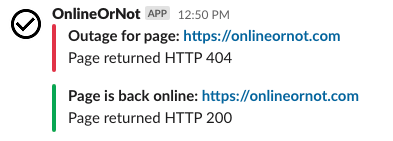
OnlineOrNot will send notifications to your chosen channel when checks go up or down:
What triggers notifications
OnlineOrNot sends two notifications per outage:
- When the outage starts
- When the outage ends
Any check that doesn't return HTTP 200 (or fails its configured assertions) is considered an outage.
Need help?
Contact max@onlineornot.com or use the feedback button in the product.