Uptime Checks
Assertions
In OnlineOrNot, assertions make it possible to monitor your response data for correctness, and get notified when your response data stops being correct (the word "assertion" is a fancy computer science word for "something you know to be correct").
How assertions work
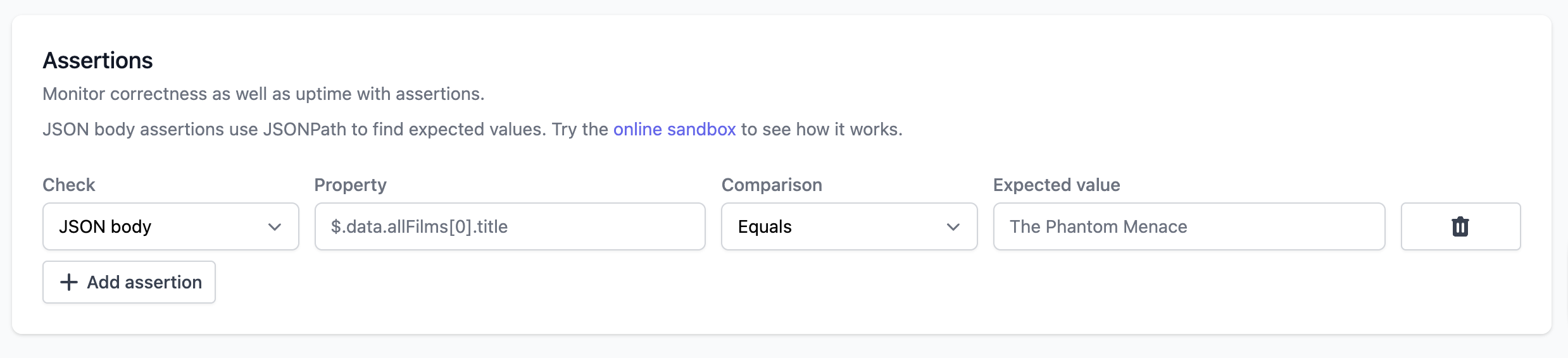
When you create an uptime check, under "HTTP request settings", you can add multiple assertions to your check.
OnlineOrNot supports three types of assertions:
- JSON body - Assert on values in JSON responses using JSONPath
- Text body - Assert on text content in the response body
- Response headers - Assert on HTTP response headers
- HTML body - Assert on HTML elements using CSS selectors
Assertions have three main fields:
- Property, where we enter the JSONPath to the key we want to assert (for JSON body), search text (for text body), or header name (for response headers)
- Comparison, which is described below
- Expected value, where we enter the value we expect to find

Assertions let you check multiple things in your response:
- That your HTTP response JSON contains an object key called "title", with the value "The Phantom Menace"
- That your HTTP response JSON contains an object key called "errors", with a value of NULL
- That your HTTP response includes a header called "Content-Type" with the value "application/json"
If any of your assertions fail, the check is considered "DOWN".
Asserting on JSON responses
For JSON body responses, OnlineOrNot uses JSONPath to find the key in your JSON object. There's also an online sandbox that you can test your assertions in.
For example, to assert that a JSON response contains a specific user name:
- Type: JSON body
- Property:
$.data.user.name - Comparison: Equals
- Expected value:
John Doe
Asserting on response headers
Response header assertions let you verify that your API returns the correct HTTP headers. This is useful for checking:
- Content types are correct (e.g.,
Content-Type: application/json) - Security headers are present (e.g.,
X-Frame-Options,Strict-Transport-Security) - Custom headers are set properly (e.g.,
X-API-Version) - Cache control headers are configured correctly
To create a response header assertion:
- Type: Response headers
- Property: Enter the exact header name (e.g.,
Content-Type,Cache-Control,X-Custom-Header) - Comparison: Select how you want to compare the header value
- Expected value: Enter the value you expect (not needed for comparisons like "Not null" or "Empty")
Response header examples
Check Content-Type is JSON:
- Property:
Content-Type - Comparison: Equals
- Expected value:
application/json
Verify a security header exists:
- Property:
X-Frame-Options - Comparison: Not null
- Expected value: (not needed)
Check Cache-Control contains a specific directive:
- Property:
Cache-Control - Comparison: Contains
- Expected value:
max-age
Verify custom header has expected value:
- Property:
X-API-Version - Comparison: Equals
- Expected value:
v2
Asserting on HTML responses
HTML body assertions let you verify that specific elements exist in your HTML pages and are not commented out. This is particularly useful for monitoring:
- Required
<meta>tags (SEO, Open Graph, viewport settings) - Analytics and tracking scripts (Google Analytics, GTM, etc.)
- Cookie consent banners
- Third-party integrations (chat widgets, CDN resources)
- Security-related elements
HTML assertions use CSS selectors to find elements in your page, just like you would with document.querySelector() in JavaScript.
How HTML assertions work
HTML assertions check three important things:
- Element is present - The element exists in the HTML
- Element is enabled - The element is NOT commented out (commented elements are ignored by the HTML parser)
- Element has expected content - For elements with content or attributes, you can verify specific values
To create an HTML body assertion:
- Type: HTML body
- Property: Enter a CSS selector (e.g.,
meta[name="viewport"],script[src*="analytics"]) - Comparison: Select how you want to validate the element
- Expected value: Enter the value you expect (for comparisons like "Equals" or "Contains")
HTML assertion examples
Check viewport meta tag exists:
Property: meta[name="viewport"]Comparison: Not nullExpected value: (not needed)
Verify meta tag has specific content:
Property: meta[property="og:type"]Comparison: EqualsExpected value: website
Check description contains specific text:
Property: meta[name="description"]Comparison: ContainsExpected value: developers
Verify Google Analytics script is present:
Property: script[src*="googletagmanager"]Comparison: Not nullExpected value: (not needed)
Check multiple analytics scripts at once:
1. Property: script[src*="analytics"] Comparison: Not null
2. Property: script[src*="cookielaw"] Comparison: Not null
Ensure cookie banner exists:
Property: .cookie-bannerComparison: Not nullExpected value: (not needed)
Verify specific element text content:
Property: h1Comparison: ContainsExpected value: Welcome
Important notes for HTML assertions
-
Commented elements will fail: If a script or meta tag is commented out like
<!-- <script src="..."></script> -->, it will NOT be found and assertions will fail. This is by design and helps you catch accidentally disabled elements. -
CSS selector syntax: You can use any valid CSS selector:
- By tag:
script,meta,h1 - By attribute:
meta[name="viewport"],script[src*="analytics"] - By class:
.cookie-banner,.modal - By ID:
#main-content - Complex selectors:
.container p,div.header > h1
- By tag:
-
Attribute selectors are especially useful:
[name="viewport"]- exact match[src*="analytics"]- contains substring[property^="og:"]- starts with[href$=".pdf"]- ends with
-
Performance: If you have multiple HTML assertions, the HTML is parsed once and reused for all checks, making it efficient.
Common use cases
1. Monitor required meta tags:
meta[charset] → Not nullmeta[name="viewport"] → Contains "width=device-width"meta[property="og:title"] → Equals "My Website"meta[property="og:description"] → Not empty
2. Verify analytics are loaded:
script[src*="googletagmanager"] → Not nullscript[src*="analytics"] → Not null
3. Check cookie compliance:
script[src*="cookielaw"] → Not null.cookie-banner → Not null
4. Validate third-party integrations:
script[src*="intercom"] → Not nullscript[src*="segment"] → Not nulllink[href*="fonts.googleapis"] → Not null
5. Ensure security elements:
meta[http-equiv="Content-Security-Policy"] → Not null
Comparisons
Assertions support the following comparisons (in which the Property is compared to the Expected Value)
- Equals
- Not equals
- Greater than
- Less than
- Null
- Not null
- Empty
- Not empty
- Contains
- Not contains
- True
- False